
Banner Image

Integrate Microsoft login into your ASP.NET Core or Orchard Core application with ease

Why create separate accounts in different systems when you can use a single, trusted source for all of them?

Instead of asking people to create yet another account, you can let them sign in with the Microsoft account they already use at work. This can be a Microsoft 365 account or an account managed through Microsoft Entra ID.

For users, this feels familiar. For administrators, it keeps account management closer to the systems they already use every day.

Why external login helps

When a portal has its own separate user account system, someone needs to manage those users separately too.

That usually means more onboarding steps, more offboarding steps, and more places where account information can drift out of sync.

External login keeps the sign-in process simpler:

  1. The user visits your portal.
  2. They choose “Sign in with Microsoft”.
  3. Microsoft authenticates them.
  4. They return to your portal as a signed-in user.

From the user’s point of view, this is straightforward. They do not need to register another account or remember another password. If they are already signed in with their Microsoft account, the process can be especially quick.

From the portal’s point of view, Microsoft confirms who the user is. Your site can then decide what that user is allowed to see or do: Microsoft sign-in handles authentication, while your portal still controls authorization.

The practical benefits

The most visible benefit is easier access. Users can start using the portal with an account they already trust and understand.

The bigger operational benefit is usually faster onboarding. New users do not need a separate portal account before they can begin. In many organizations, this makes internal rollouts smoother and reduces the number of account-related questions.

It can also reduce support overhead. Password resets, locked accounts, and account lifecycle tasks are easier to handle when fewer systems are involved.

There are security benefits too. Fewer separate credentials means fewer separate login details to manage, store, forget, or reuse. And when your organization already has Microsoft account policies in place, your portal login can fit into that existing identity setup instead of becoming another isolated system. We could also discuss periodic password changes and how little they actually help, or even how they can make security worse. For a while, they seemed to improve security, but over the years research has shown that this practice is, in fact, an anti-pattern. But let's not open that door here.

Easily implement SSO

In Orchard Core, an ASP.NET Core-based CMS and framework, you can enable the Microsoft 365 or Entra ID login features, fill in your credentials, and use Microsoft sign-in in your site. Due its modular nature, integrating this feature into any ASP.NET Core application is as simple as referencing one or more (depending on how much of Orchard Core’s user management capabilities you want to user) NuGet packages.

Existing users can attach their Orchard Core account to their Microsoft account. If registration is enabled, you can also let new users in when they have an account in your Microsoft organization or Entra ID setup.

There is also a built-in way to control what username should be generated for new users, and what roles users should receive based on external claims. You still need to handle internal roles and permissions, but you can decide what roles Microsoft users should get.

Okay, how can I try this?

You can try Microsoft login in Orchard Core without writing custom code.

The easiest way is to create a site on DotNest, our Orchard Core hosting platform. DotNest lets you run an Orchard Core site without managing hosting, upgrades, or infrastructure yourself. It also allows you to log in with your Microsoft account, so you can experience the same kind of streamlined sign-in flow directly.

Create a site on DotNest, enable the Microsoft authentication feature, connect it to your Microsoft app registration, and test the login flow.

You don’t need to build Microsoft SSO from scratch: Orchard Core already provides the admin-side setup, and DotNest gives you an easy environment to try it.

Choose the Microsoft login option

First, decide which Microsoft login option fits your case:

  • Microsoft Account: If you want users to sign in with personal Microsoft accounts.
  • Microsoft Entra ID: If you want users to sign in with work or school accounts from Microsoft 365 or your organization’s Entra ID tenant.

Set up Microsoft Entra ID login

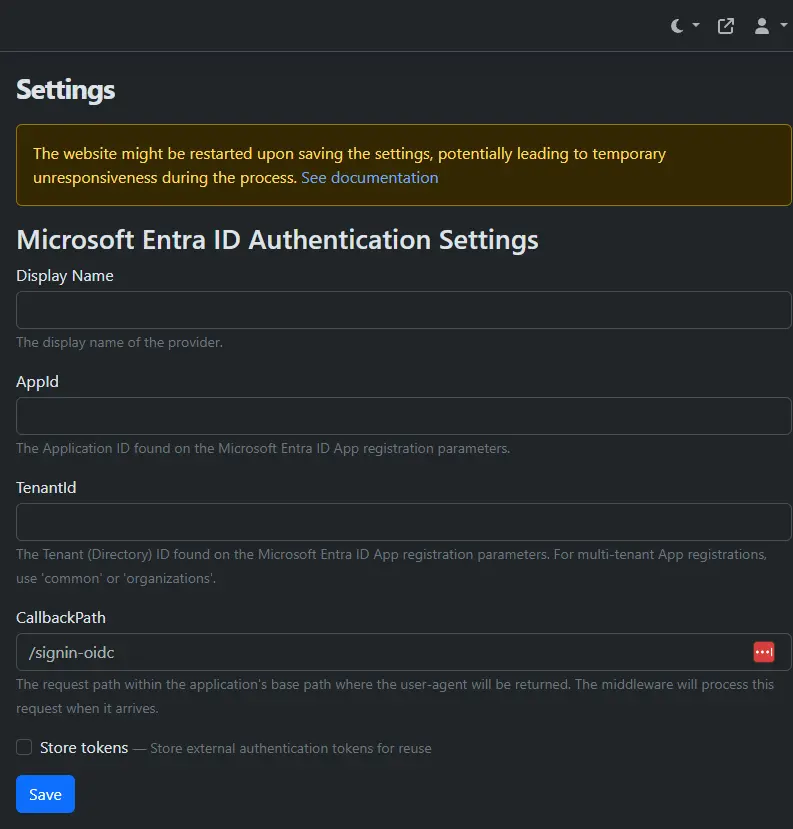
  1. Enable the Microsoft Entra ID Authentication feature in Orchard Core.
  2. Create an application registration in Microsoft Entra ID and configure the required redirect URI.
  3. Copy the Application ID and Tenant ID from Microsoft Entra ID.
  4. Enter those values in the Orchard Core Microsoft Entra ID authentication settings.
  5. Save the configuration and test the login flow.

After this, the login page can show a Microsoft sign-in button. Users authenticate with Microsoft, and Orchard Core handles the local user account, roles, and permissions.

Decide who can register

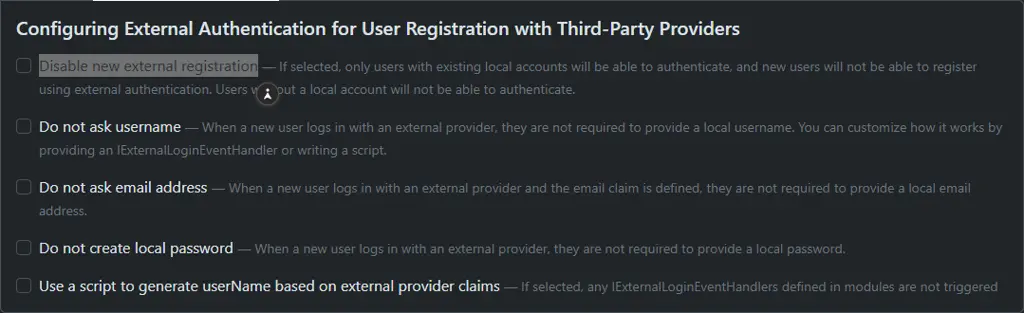
If registration is enabled, new Microsoft users can be created as local Orchard Core users during their first login. If registration is not enabled, only existing local users can use Microsoft login.

Existing users can also link their local Orchard Core account to their Microsoft account through external logins. This is useful when you already have users in the portal and want to introduce Microsoft login later without recreating everyone manually.
Map users to roles

Authentication only answers the question: "Who is this user?"

Your portal still needs to answer: "What can this user access?"

That is where Orchard Core roles and permissions remain important.

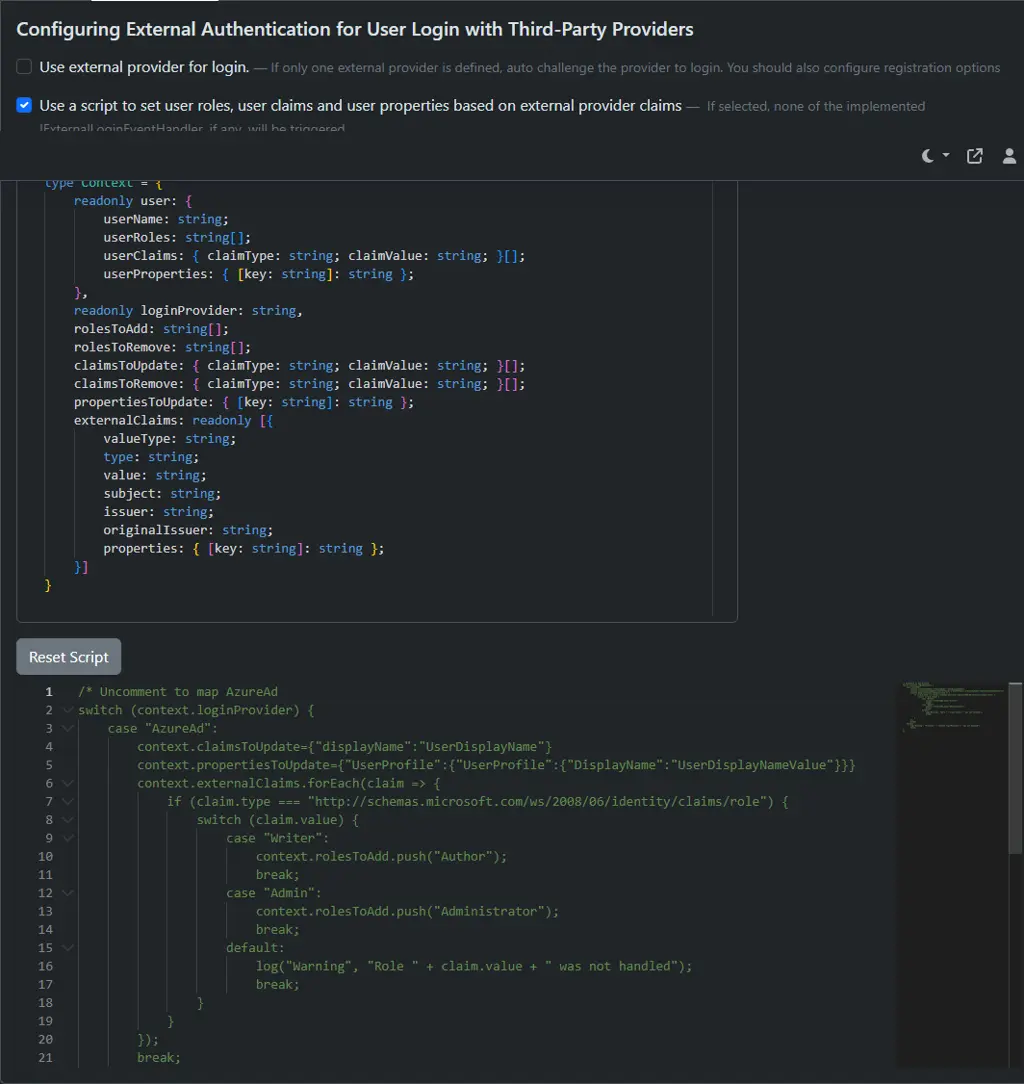
You can keep managing roles in Orchard Core, or configure role assignment based on external claims from Microsoft Entra ID. This lets you connect Microsoft-side identity information with Orchard Core access control.

For example, you can decide that users from a specific Microsoft Entra ID group should receive a specific Orchard Core role. That way, Microsoft remains the identity source, while Orchard Core controls what portal features, pages, or admin areas the user can access.

You can do this from the user login settings on the admin directly:
Check out the official documentation for setting this up, or contact us to integrate Microsoft SSO into your ASP.NET Core application or Orchard Core portal, configure the right user flow, and connect Microsoft identities with Orchard Core roles and permissions.


krisztian.nemeth DotNest Microsoft Orchard Core Login ASP.Net SSO

Other recent posts

Managed CMS Hosting Now Available in the Microsoft Marketplace — Powered by DotNest

Microsoft customers worldwide can now discover and use DotNest, a fully managed website hosting platform, through Microsoft Marketplace, accessing trusted solutions that accelerate innovation and business transformation with unified integration across Microsoft productsBudapest, Hungary — June 23, 2026 — Lombiq Technologies today announced the availability of DotNest, a fully managed content management and website hosting platform, in the Microsoft Marketplace, the unified online destination for customers to buy trusted cloud solutions, AI apps, and agents to meet their business needs. DotNest customers can now discover and deploy trusted solutions through Microsoft Marketplace, with smooth integration and streamlined management across Microsoft Azure and other Microsoft products.DotNest is the only fully managed hosting service for Orchard Core, the open-source, modular content management system (CMS) framework built on ASP.NET Core. Built and operated by Lombiq Technologies, a major contributor to the Orchard project for more than a decade, DotNest brings enterprise-grade Orchard Core hosting to organizations without the complexity of running their own infrastructure. Today, DotNest powers more than 6,000 websites worldwide.DotNest delivers Orchard Core as a fully managed SaaS on Microsoft Azure, removing the infrastructure burden of server management, security patching, and version upgrades. Now available in the Microsoft Marketplace, organizations can procure DotNest directly through their existing Azure subscription and manage their websites from the Azure Portal alongside their other cloud resources. Key capabilities include:Zero technical maintenance: Hosting, monitoring, and platform updates are handled automatically so teams can focus on building, not operating.Native Azure integration: Sites are provisioned and managed from the Azure Portal, backed by Azure security, point-in-time backups, HTTPS, and geo-redundant storage.Complete design freedom: Full Orchard Core customization is preserved, with automatic theme deployment from source control and support for custom content types and modules.Built-in ecommerce: Organizations can launch online stores using the integrated Orchard Core Commerce suite without additional platform setup.Enterprise performance: Optimized infrastructure with CDN, caching, Elasticsearch, and email delivery requires no infrastructure configuration from the customer.GDPR compliance: DotNest is compliant out of the box with privacy-focused defaults suited for EU organizations.The offering is designed for IT teams looking to reduce infrastructure overhead, marketing teams that want to launch and update web properties without depending on development cycles, and digital agencies that prefer to focus on customization rather than operations. "Bringing DotNest to the Microsoft Marketplace is a natural step for us,” said Zoltán Lehóczky, Co-Founder and managing director of Lombiq Technologies. “We have spent over ten years building DotNest and contributing to Orchard Core itself. Listing in the Microsoft Marketplace means any Microsoft customer can now provision a fully managed Orchard Core site in minutes, using the same Azure subscription they already rely on for everything else, no separate procurement, no infrastructure work, and no compromise on the flexibility of the open-source platform.” “Microsoft Marketplace helps organizations and partners move faster, work smarter, and grow by connecting them with the right solutions—all in one trusted place,” said Cyril Belikoff, vice president, Microsoft Azure Product Marketing. “We’re happy to welcome Lombiq Technologies’ DotNest solution to the growing Microsoft Marketplace ecosystem.” Microsoft Marketplace is a single destination to find, try, and buy trusted cloud solutions, AI apps, and agents to meet your business objectives. Choose from a growing collection of solutions tailored to your unique needs, available both in Marketplace and directly within Microsoft products. DotNest is available now in the Microsoft Marketplace at https://marketplace.microsoft.com/en-us/product/saas/lombiq.dotnest-production. To learn more about DotNest, visit https://dotnest.com. Lombiq Technologies is a software, training, and services company focused on web development with open Microsoft technologies, predominantly the Orchard Core content management system. With more than a decade of contributions to the Orchard Core ecosystem, Lombiq provides custom development, training, consulting, and hosting services to clients worldwide. The company is the team behind DotNest, the only Orchard Core SaaS. Learn more at https://lombiq.com. For more information, press only: Lombiq Crew, Lombiq Technologies, [email protected]

Long-term Orchard Core maintenance for the City of Santa Monica

Back in 2021, we wrote about helping the City of Santa Monica move santamonica.gov from Orchard 1 to Orchard Core. Since then, we have continued working with the City's team.

In the last couple of years, much of that work has been maintenance: upgrading Orchard Core, improving tests, making local development easier, cleaning up the codebase, and fixing performance issues.

The Orchard Core upgrade was an important part of this. Keeping the CMS version current helps the site stay on a safer and better-supported foundation. It also brings in fixes from Orchard Core itself, including fixes for issues that could otherwise affect users, editors, or developers.

The other changes support the same kind of work. Automated tests help catch problems before deployment. Auto Setup makes local development more predictable. Static analyzers, codespell, and Renovate make the codebase easier to maintain. 

Most of this is not visible from the outside, but it is important for keeping a long-running website working well.

Rebuilding DotNest.com: Orchard Core, Tailwind 4, and a more maintainable workflow

DotNest is Lombiq’s managed Orchard Core hosting platform where users can create and run Orchard Core sites without handling infrastructure, updates, or maintenance themselves. We recently rebuilt the site to give DotNest a clearer presentation and a more modern user experience. By looking behind the scenes of the DotNest site rebuild, you’ll see how a website redesign can become a broader modernization project: improving how landing pages are structured, introducing Tailwind 4 into an Orchard Core front-end workflow, simplifying asset handling, and using AI-assisted tools in a practical way while keeping developers in control. Why the rebuild mattered The previous site served its purpose, but it no longer matched what we envisioned for DotNest. Beyond a more modern design, we needed clearer messaging, and a content management structure that would be easier to maintain as the site evolved. This was especially important because DotNest is more than a marketing website. It also reflects how we approach building maintainable Orchard Core platforms. If the site itself is hard to update, every future improvement becomes slower and more expensive than it should be. So we treated the rebuild as more than a visual refresh. It became a chance to rethink the site’s structure, front-end workflow, and development process in a way we can reuse on future Orchard Core projects. Building landing pages around reusable sections One of the main changes was how landing pages are structured in Orchard Core. Previously, the DotNest pages used simple Liquid widgets for page sections. This was quick and flexible while most changes were made directly by developers, but it also meant that the page structure was less explicit and harder to evolve consistently over time. Around the same time, the Orchard Core community was also moving toward more reusable “Blocks”-style page structures, which aligned closely with the direction we already wanted to take for DotNest. The rebuild became a good opportunity to apply a similar pattern in practice. For the new site, each landing page section now has its own content type, and the sections are composed on the landing page through Orchard Core’s BagPart. This keeps the flexibility of section-based pages while giving each section a clearer structure and purpose. The result is a landing page system that is easier to understand, easier to extend, and less dependent on ad-hoc template changes. At the same time, the reusable section-based approach gives content editors flexibility within clear guardrails, making it much harder to accidentally break layouts or page structure. For a marketing site that will keep evolving, that maintainability matters as much as the initial design. Modernizing the front-end workflow The rebuild was also the point where we introduced Tailwind 4 into our internal front-end workflow for Orchard Core projects. Previously, we used a BEM-style approach with custom CSS files. While this worked well for years, it also created more manual structure and coordination as the site evolved. With Tailwind 4, we could build UI components faster, keep styling closer to the markup, and work more consistently with our design system. As part of the rebuild, we removed the old Node.js-based asset pipeline and integrated Tailwind directly into the .NET build workflow. That led to Lombiq Tailwind Targets, our open-source MSBuild integration for Tailwind CSS. With Lombiq Tailwind Targets, Tailwind compilation runs as part of the .NET build process, making the front-end workflow feel like a natural part of the Orchard Core application instead of a separate toolchain to maintain. This also aligned with a broader direction we had already started exploring at Lombiq: simplifying front-end tooling and moving away from Node.js-based workflows where they add unnecessary maintenance overhead. We wrote earlier about this approach in Step away from that Node.js. Using AI where it helps, with developers still in control AI-assisted tools became part of the rebuild mainly in the UI and front-end workflow. We used Magic Patterns to explore UI directions and generate Tailwind-based starting points from our design system. Since the generated code was not always aligned with Tailwind 4 or the final Orchard Core implementation, we still reviewed and refactored it before integrating it into the site. To support this workflow, we also created two open-source repositories: Tailwind Agent Skills and Orchard Core Agent Skills. These agent skill collections give AI tools more project-specific context around Tailwind 4, Orchard Core theming, content modeling, shapes, and recipes, making the output far more useful than generic prompting alone. The goal was not to automate development away, but to make AI-assisted work more practical and reviewable for real Orchard Core projects. AI helped speed up repetitive and exploratory tasks, while developers still made the architectural and implementation decisions needed to keep the final result maintainable. What we gained from the project One of the biggest takeaways was how much easier Orchard Core landing pages become to manage once reusable sections and clearer content structures are introduced. The previous setup had gradually accumulated friction over time, while the new approach already feels easier to extend and work with. The rebuild was also our first larger Tailwind 4 project, and it significantly changed how quickly we can build and adjust UI components. That experience directly led to Lombiq Tailwind Targets and helped shape how we want to handle front-end workflows in future Orchard Core projects. We also learned a lot about practical AI-assisted development. Working on a real-world project made it much clearer where AI tools actually help and where developer oversight still matters. That experience ultimately led to the Tailwind Agent Skills and Orchard Core Agent Skills repositories. Most importantly, we validated different development approaches for future Orchard Core websites. If you’re planning an Orchard Core website, a redesign, or a modernization project, reach out to us. We’re always happy to help teams build Orchard Core solutions that remain easy to evolve as requirements grow over time.

Your analytics isn’t broken. It’s incomplete.

Web analytics is the foundation of modern marketing decisions. But today, a growing portion of user behavior simply doesn’t show up in your reports.

Ad blockers, browser extensions, and privacy tools can strip tracking parameters or block analytics scripts entirely. The result is incomplete campaign data, misleading attribution, and decisions based on partial visibility.

For marketing and product teams, this is not just a technical inconvenience. It is a business risk. Campaign performance becomes harder to evaluate, budgets are harder to justify, and growth decisions rely on guesswork instead of evidence.